DeltaFX Broker: No Regulation Exposed
DeltaFX Broker: No Regulation Exposed risks, scams & blocked withdrawals with zero oversight. High fraud exposure—read full review now!
Original

简体中文
繁體中文
English
Pусский
日本語
ภาษาไทย
Tiếng Việt
Bahasa Indonesia
Español
हिन्दी
Filippiiniläinen
Français
Deutsch
Português
Türkçe
한국어
العربية

Abstract:Avatrade is a trustworthy global brand, renowned for offering access to forex and CFDs , and it has been once again named the "Best Broker for Education and Beginners of 2024" due to its outstanding educational content. Avatrade excels in copy trading and is highly competitive in mobile trading, while its pricing and research are in line with the industry average. This broker is always committed to providing an excellent trading experience for traders of all kinds. Today, we will test the account opening process at Avatrade to evaluate whether it is simple and quick, offering users a good account opening experience.
Avatrade is a trustworthy global brand, renowned for offering access to forex and CFDs , and it has been once again named the “Best Broker for Education and Beginners of 2024” due to its outstanding educational content. Avatrade excels in copy trading and is highly competitive in mobile trading, while its pricing and research are in line with the industry average. This broker is always committed to providing an excellent trading experience for traders of all kinds. Today, we will test the account opening process at Avatrade to evaluate whether it is simple and quick, offering users a good account opening experience.
Click “Register” on the official website homepage to navigate to the account registration interface.
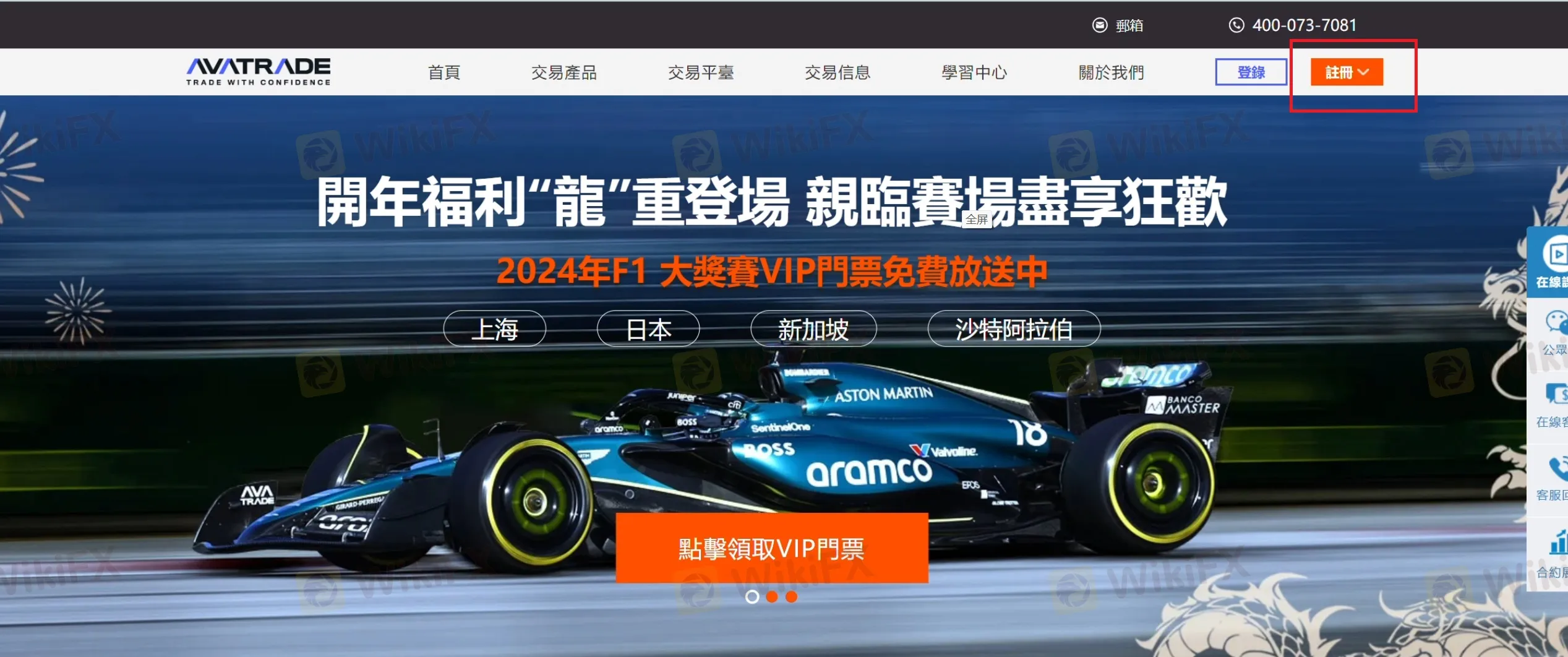

2. Fill in your name, email, and phone number to set up an account.

3. Fill in user information, including personal details, setting a password, and selecting a trading platform:
Personal details: Mandatory information includes date of birth, ID number, full name in Chinese, city, district name, street number, postal code, and WeChat ID, with optional information being apartment/suite/unit, etc.


Set a password. The password should include:
Between 8-15 characters
Use both uppercase and lowercase letters
At least 1 number
At least 1 special character (_!@#$%^&*)
Select a trading platform and base currency

Trading platforms available:MetaTrader4, MetaTrader5, AvaOptions

Available Base Currency:USD, EUR, GBP, CHF

4. Complete the questionnaire and confirm the terms and conditions
Fill in the questionnaire, including main occupation, estimated total annual income, estimated total value of savings and investments, level of financial risk you can bear, current employment status, and source of trading funds.

5. Confirm the terms and conditions.

Verify the account by uploading the required documents.

ID Card. You need to upload images or files of both the front and back sides of the ID card, or you can upload a driver's license or passport.


Utility bill. The requirements are as follows:
Valid documents: User's most recent property bill (this includes water, electricity, gas, and other public utility fees), bank statement (information on credit cards, savings accounts, loans, etc.), credit card statement, real estate insurance information, vehicle insurance information, tax certificate.
The document must be valid within 6 months prior to the upload date.
The bill must include the current address to provide proof of residency.

Other documents. If the user is representing an individual rather than a company, additional documents will be required.

6. Start trading. Once the account has been verified, download MetaTrader 4 or go to the web trading page, enter the login details and the password you set up, select the server provided by the broker, and log in to MT4 to start trading.


You can also download the AvaTradeGo App, use your email and the password you just set up to log into your AvaTrade account, and start trading.

Overall Experience: The account opening process at AvaTrade is transparent, straightforward, and easy to operate, with website guidance that is easy to understand. The broker promises to ensure the security of the verification documents submitted by users, with a fast review process.
Click on the “avatar” in the upper right corner, and under the Account Overview, in the MT4 Account section, click “Connect New Account”.

In the input box for connecting to a server, search for AvaTrade, and select the server provided by the broker.


Enter your MT4 account and password, then click confirm.

Once connected successfully, return to the homepage and start trading.

Overall Experience: Linking a broker account to a WikiTrade account is straightforward and easy to operate.
Disclaimer:
The views in this article only represent the author's personal views, and do not constitute investment advice on this platform. This platform does not guarantee the accuracy, completeness and timeliness of the information in the article, and will not be liable for any loss caused by the use of or reliance on the information in the article.
DeltaFX Broker: No Regulation Exposed risks, scams & blocked withdrawals with zero oversight. High fraud exposure—read full review now!
Errante presents itself as a regulated forex broker with multiple platforms and instruments. However, user complaints about withdrawals and account issues raise red flags despite its licenses. Our analysis delves into its compliance, features, and risks to determine whether it’s reliable or shady.
Have you experienced illegitimate profit cancellations by INVESTIZO, a Saint Vincent and the Grenadines-based forex broker? Did the broker deduct unfair amounts in the name of a dividend or swap adjustment? Was your trading account frozen because the broker let someone trade on your behalf? Facing withdrawal blocks and no response from the customer support team to your queries? Many traders have highlighted these alleged forex trading activities online. It’s time we take a close look at some complaints through this INVESTIZO review article. Keep reading!
Mazi Finance is a trading company registered in Saint Lucia, an offshore location. Recently, it has received a lot of attention in the trading world. The company shows off many modern trading features, but when we look closer, we find many potential dangers. Before any trader thinks about opening an account, they need to understand the most important finding from our research: Mazi Finance does not have proper regulation. This single fact creates major warning signs about whether client capital is safe.
 WikiFXWikiFXWikiFXWikiFXWikiFXWikiFXWikiFXWikiFXWikiFXWikiFX
