

Global Broker Regulation Inquiry App
WikiFX
English
简体中文
繁體中文
English
Pусский
日本語
ภาษาไทย
Tiếng Việt
Bahasa Indonesia
Español
हिन्दी
Filippiiniläinen
Français
Deutsch
Português
Türkçe
한국어
العربية
FOREX.com Login and Demo Account: Step-by-Step Account Access
Abstract:Access your FOREX.com trading account or open a demo account for risk-free practice. Learn login steps, demo account features, and secure account management.
How to Get Started with FOREX.com Accounts?
Opening accounts at FOREX.com is a seamless process for both live and demo accounts. For new traders, the demo account serves as a crucial first step. It comes with $50,000 in virtual funds and a fully functional trading platform, allowing traders to practice trading 80+ FX pairs, stock CFDs, indices, commodities, and more without risking real capital.
The demo account is active for 90 days and can be accessed via the FOREX.com web/mobile platform or MetaTrader 4/5. Login credentials are emailed immediately after registration, enabling traders to start practicing within minutes and gain confidence before committing real funds.
Step-by-Step Guide to Logging in and Opening Accounts
Step 1: Visit the FOREX.com login page or account registration page.
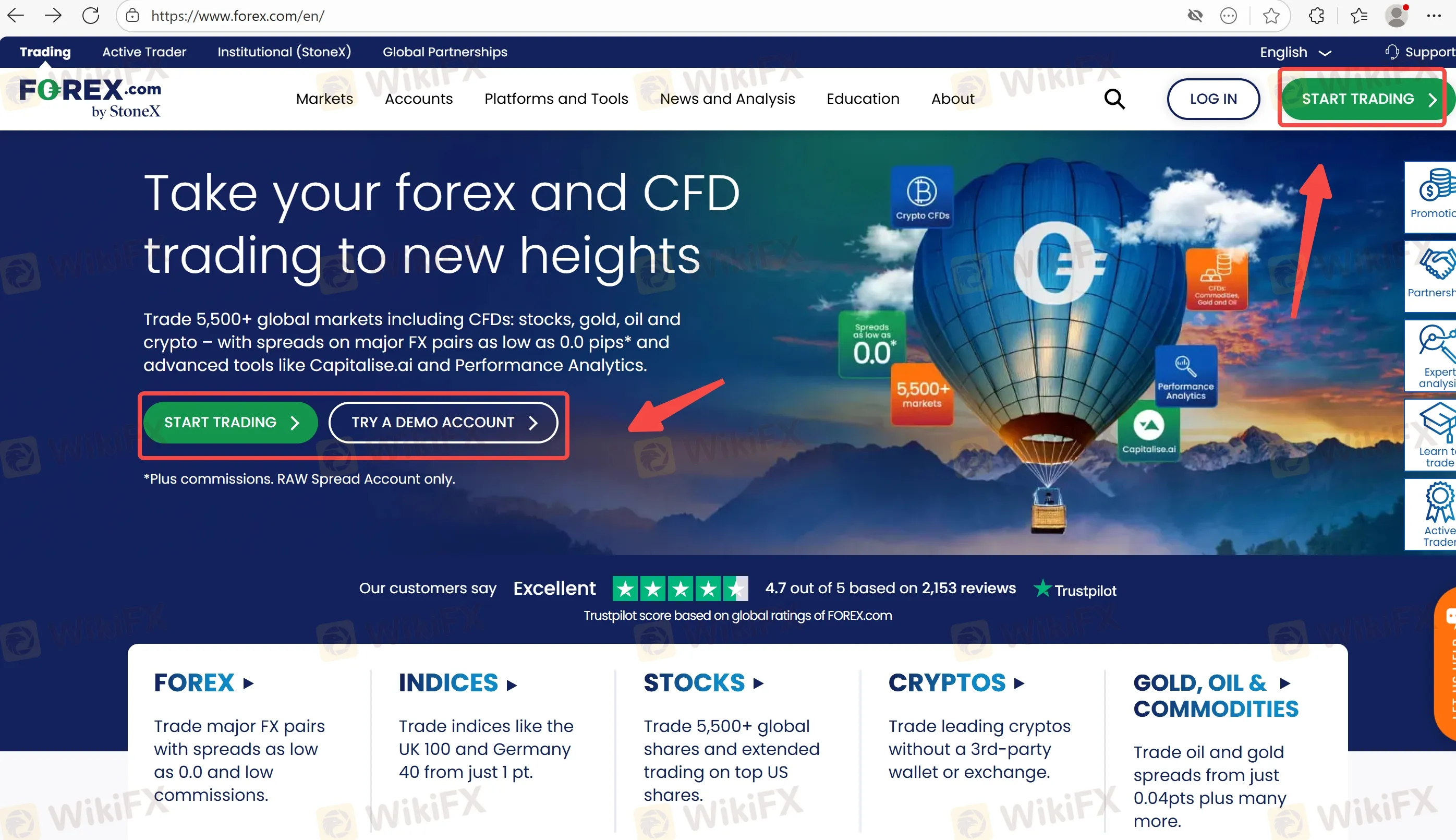
Step 2: For live accounts, enter the username/email and password. For demo accounts, submit full name, email, phone number, and create a password.
Step 3: Confirm consent for disclosures and privacy policy, then submit. Demo credentials are emailed to the trader.
Step 4: Once logged in, explore web, mobile, or MetaTrader platforms. For demo accounts, the $50,000 virtual balance allows practice without financial risk.
Step 5: MetaTrader users should follow the platform-specific login instructions to connect to either MT4 or MT5 demo servers.
Demo Account Features at a Glance
| Feature | Details |
| Risk-Free Trading | I trade without risking real money, using virtual funds to hone strategies. |
| Market Access | Trade 80+ FX pairs, stock CFDs, indices, commodities, and more with advanced charts and indicators. |
| Real-Time Pricing | Experience live market pricing and execution for an authentic trading experience. |
| Platform Options | Access via FOREX.com Web, Mobile, or MetaTrader 4/5 for full flexibility. |
| Duration | 90 days for standard demo accounts; MT4 demo accounts also last 90 days unless trades remain open. |
The demo account environment closely mirrors live trading conditions, though margin, leverage, and rollover charges may vary slightly. This allows traders to practice strategies realistically while becoming familiar with platform tools and market behavior.
FAQs about FOREX.com Login & Demo Account
How long does a demo account last?
- FOREX.com demo accounts are active for 90 days. MT4 demo accounts follow the same 90-day rule unless there are open trades.
Can demo accounts be renewed?
- Demo accounts cannot be renewed. Traders must open a new demo account to continue practicing after expiration.
What is the difference between demo and live accounts?
- Demo accounts use virtual funds and allow trading without real capital, while live accounts involve actual funds and exposure to real market risks.
How do traders log into their demo account on MetaTrader?
- Traders follow the MT4/MT5 login instructions provided by FOREX.com to connect to the demo server using their credentials.
Will demo account trading results reflect real-world performance?
- Demo account results are hypothetical. Market conditions in live accounts, including pricing, execution, and margin requirements, may differ.
Can traders access demo accounts on mobile and web simultaneously?
- Yes, FOREX.com allows practice on web, mobile, or MetaTrader platforms interchangeably, providing a seamless demo experience.
Disclaimer:
The views in this article only represent the author's personal views, and do not constitute investment advice on this platform. This platform does not guarantee the accuracy, completeness and timeliness of the information in the article, and will not be liable for any loss caused by the use of or reliance on the information in the article.
WikiFX Broker
Latest News
65 Arrested in Cambodia’s Cyberscam Raid | Inside the ‘Pig-Butchering’ Fraud Factory
 WikiFX
ALL CASH BROKER Review 2026: Is this Forex Broker Legit or a Scam?
WikiFXFINRA Fines Arcadia Securities $40,000 for Net Capital Violations
WikiFX150,000 Scam Accounts Linked to Fake Crypto and Romance Schemes Removed by Meta
WikiFXMSquare Review 2026: Is this Broker Safe?
WikiFXAmari Capital: Unregulated Operations, Low WikiFX Score, and Recent Trader Complaints
WikiFXAMP Global Review: A Closer Look at Regulatory Status and User Concerns
WikiFXIs IMPERIAL Safe or Scam: A 2026 Expert Analysis
WikiFXJustMarkets Review: Deposit Issues, Withdrawal Denials & Slippage Complaints Explained
WikiFXBAAZEX Review 2026: Offshore License and Regulatory Red Flags
WikiFXCurrency Calculator
USD

CNY
Current Rate:0
Amount
USD
Available
CNY
Calculate 