

Global Broker Regulation Inquiry App
About WikiFX
English
简体中文
繁體中文
English
Pусский
日本語
ภาษาไทย
Tiếng Việt
Bahasa Indonesia
Español
हिन्दी
Filippiiniläinen
Français
Deutsch
Português
Türkçe
한국어
العربية
CasaTrade Login and Account Setup: How to Register, Verify and Secure Your Account?
Abstract:Step-by-step guide to creating, verifying, and accessing your CasaTrade account, including demo trading, security features, and troubleshooting.
How Do You Create a CasaTrade Account?
Registration Process (3 Simple Steps)
- Sign Up – Provide basic details (name, email, phone number)
- Verify Email/Phone – Confirm via OTP or link
- Complete Profile – Submit ID (passport, drivers license) and proof of address
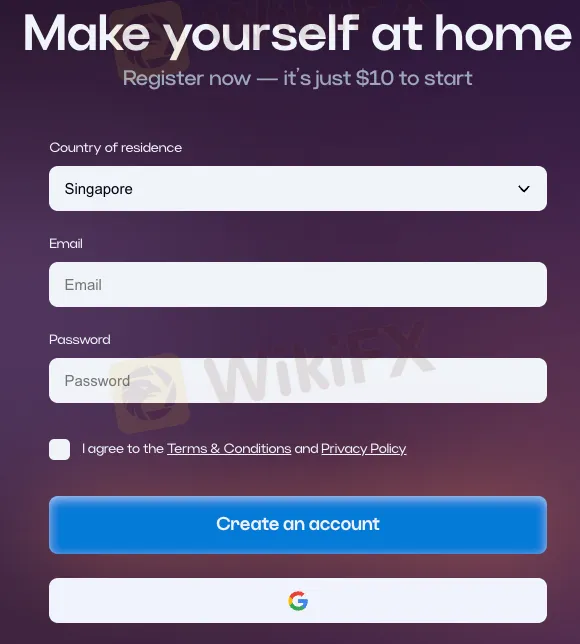
Key Notes:
- No deposit required to register
- Demo account ($10K virtual funds) available immediately
- Full verification needed before live trading
How to Log In & Secure Your Account?
Login Methods:
✔ Email/Password – Standard authentication
✔ Two-Factor Authentication (2FA) – Recommended for security (Google Authenticator/SMS)
✔ Biometric Login – Fingerprint/Face ID on mobile
Security Tips:
- Avoid public Wi-Fi when logging in
- Change password every 3-6 months
- Enable login notifications for suspicious activity
Forgot Password?
Reset via email/SMS – takes <2 minutes
What Can You Do with a Demo Account?
Features & Limitations:
✅ Practice with $10K virtual funds (refillable anytime)
✅ Test strategies on real market conditions (no execution delays)
✅ Access all platform tools (charts, indicators, economic calendar)
❌ No real profits – Demo trades dont affect live markets
❌ Tournament restrictions – Some competitions require verified accounts
Demo vs. Live Account Differences
| Feature | Demo Account | Live Account |
|---|---|---|
| Funds | Virtual ($10K) | Real money |
| Withdrawals | Not allowed | Yes (after verification) |
| Trading speed | Simulated | Real execution |
Troubleshooting Login Issues
Common Problems & Fixes:
“Invalid Password” – Reset via email or contact support
2FA Not Working – Sync time in Google Authenticator
Account Locked – Usually due to multiple failed attempts (unlocks in 1 hour or via support)
App Crashing – Clear cache or reinstall the PWA/mobile app
Contact Support:
- 24/7 live chat (avg. response: <5 mins)
- Email: support@casatrade.com (response within 24 hrs)
FAQs: Login and Account Access
Q: Can I use the same account on multiple devices?
A: Yes, but simultaneous logins may trigger security alerts.
Q: Is there a mobile app?
A: Yes – Android app on Google Play; iOS users can install the PWA.
Q: Why was my account suspended?
A: Possible reasons: unverified documents, suspicious activity, or breach of T&Cs.
Q: How long does verification take?
A: Typically 1-3 business days (longer if documents are unclear).
Q: Can I change my registered email/phone?
A: Yes, via account settings – may require re-verification.
Disclaimer:
The views in this article only represent the author's personal views, and do not constitute investment advice on this platform. This platform does not guarantee the accuracy, completeness and timeliness of the information in the article, and will not be liable for any loss caused by the use of or reliance on the information in the article.
WikiFX Broker
Latest News
LONG ASIA News on Trading: Wrong NZ FMA Authorization Claims, Non-stop User Allegations
 WikiFX
traze Exposure: Does the Broker Execute Trades During Non-Market Hours?
WikiFXWhy Small Position Sizes and Less Trading Keep You Alive
WikiFXDecoding Currency Pairs and Finding the Right Broker Account
WikiFXYen Stabilizes While Gold Prices Slip
WikiFXState Street Group Review 2026: Ponzi Scheme Warnings, Unverified Regulation, and Extreme Risk
WikiFXMan Loses Over RM400,000 in Stock Investment Scheme
WikiFXEveryone Talks About AI’s Power. Few Ask What It Does to Financial Decisions
WikiFXINTERTRADER Review 2026: Should You Trade With This Broker?
WikiFXDIRECT FX Review 2026: Unverified Regulation and High-Risk Signals
WikiFXCurrency Calculator
USD

CNY
Current Rate:0
Enter amount
USD
Redeemable Amount
CNY
Calculate 